How to Add a WordPress Form Anywhere!
Looking to add a WordPress form to a page, popup, or to share with just a link? Pretty much everything comes with a basic form tool included these days, but they can be finicky about placement and pretty limited functionally. Ninja Forms is the perfect free WordPress form plugin for dropping a form in just the right spot without a fuss!
How to add a WordPress form anywhere
Choose any one of these five options. You’ll only need one. Which you choose is entirely up to your preference, just pick whatever best fits your workflow!
Ninja Forms comes with a simple contact form ready to go, but if you need help creating your first form you can get started with easy to follow documentation, or grab one from our growing form template library! Make sure you have the free, core plugin installed first 😉
Option 1: Gutenberg block
This method is perfect for you if you need the form to appear in a specific spot on a page.
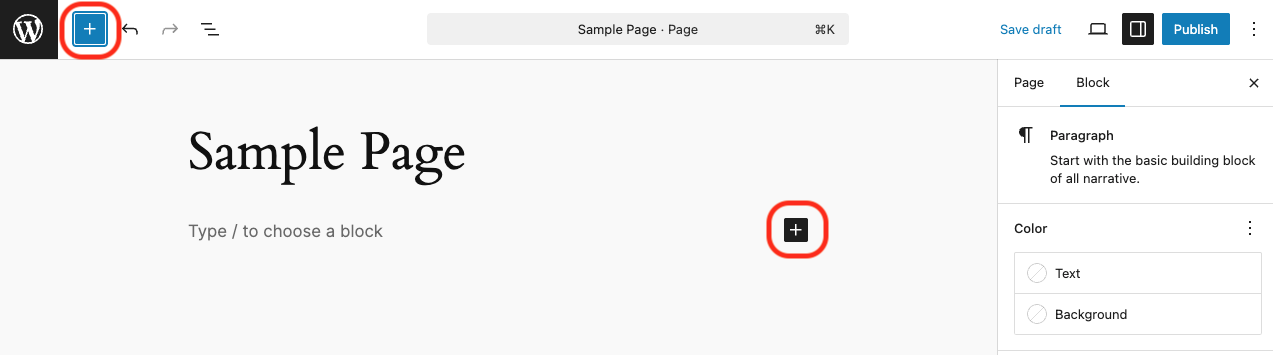
On a new or existing page, you’ll find Ninja Forms as an option in the blocks sidebar or inline when you go to add a new block. Just type Ninja Forms into the search bar and we’ll pop up!
Click either spot, search and…
…here we go:
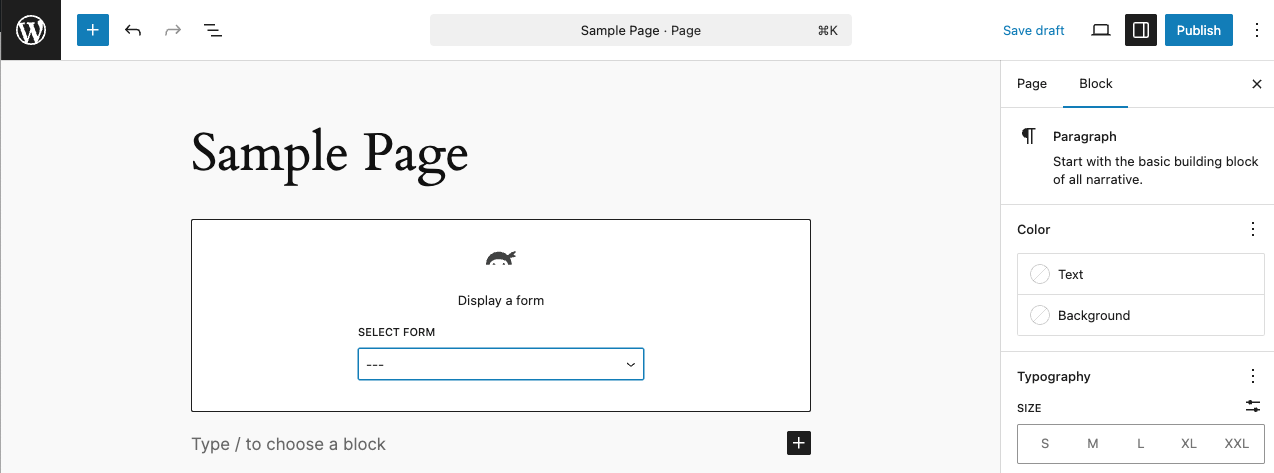
Now just choose the form you want to add in the form block’s dropdown and the form will appear on the page right on the spot.
Option 2: Append a Form
This method is a quick and easy way to drop a form onto the bottom of a page.
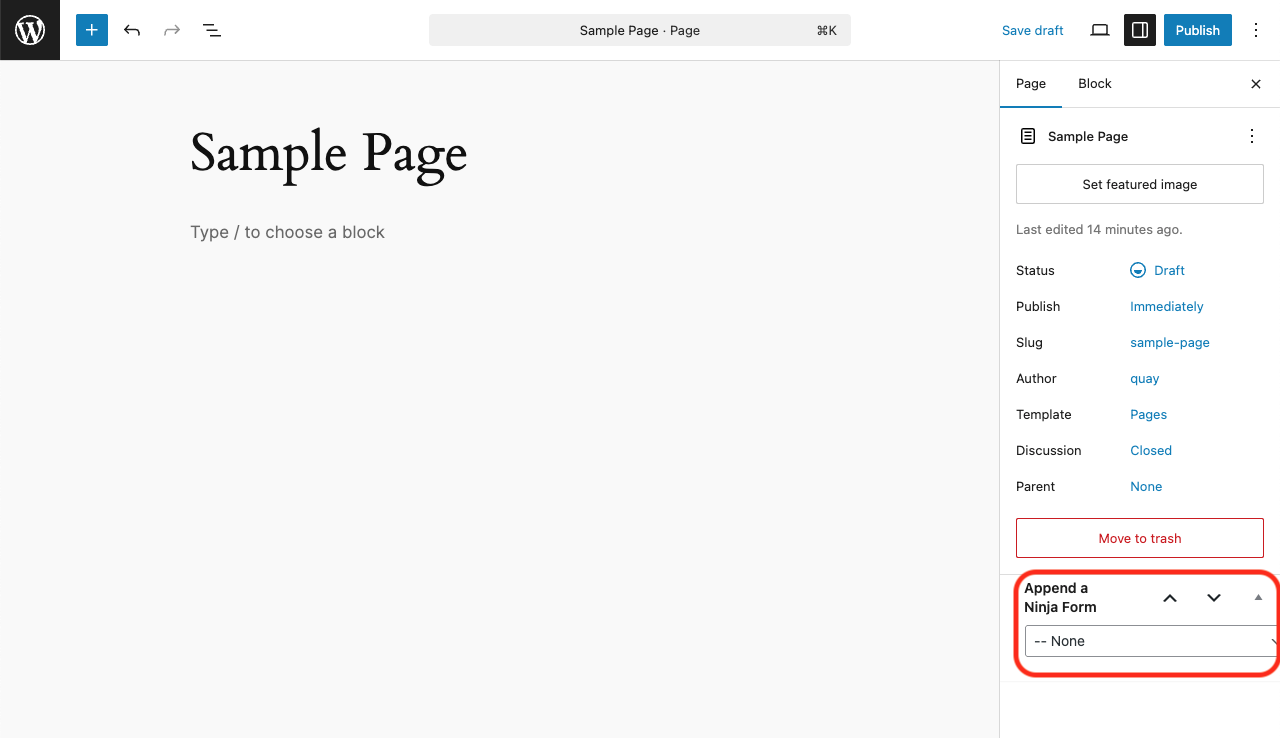
On any page, check out the right hand sidebar and you’ll see “Append a Ninja Form”. Just choose the form you want from the dropdown selector, and the form will appear at the page’s bottom.
Option 3: Shortcode
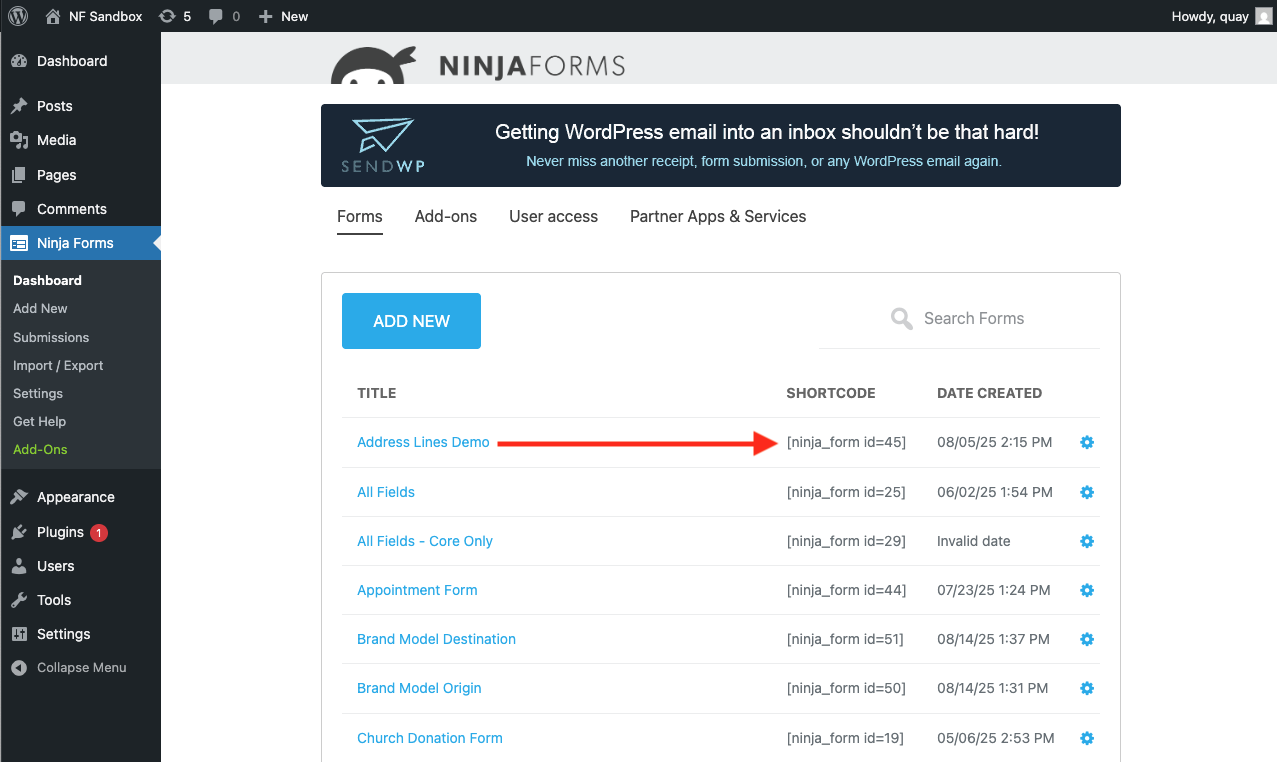
Use this method if you need the form in a super specific location. It takes a few extra seconds to grab the form’s shortcode, but once you have it you can paste it in the exact spot you want the form to appear.
In your admin sidebar go to Ninja Forms > Dashboard and find your form. The shortcode is right there next to it:
Option 4: Shareable Link
Want to share a link to the form but have it only accessible by that link, not on a page? This is your option.
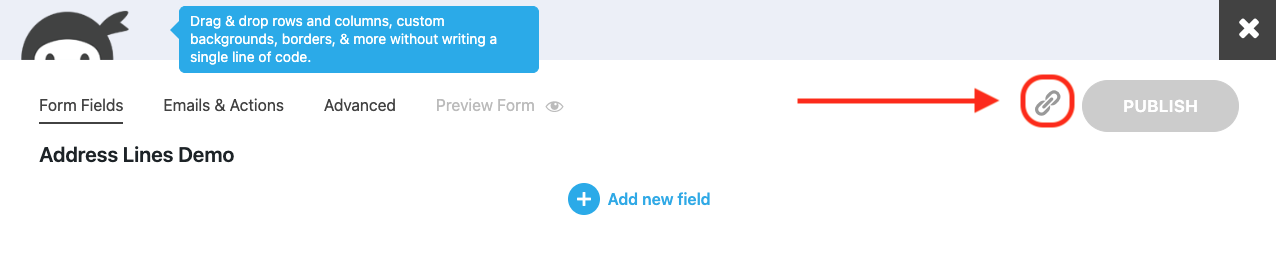
Open up your form and see the little link icon next to Publish. Click it.
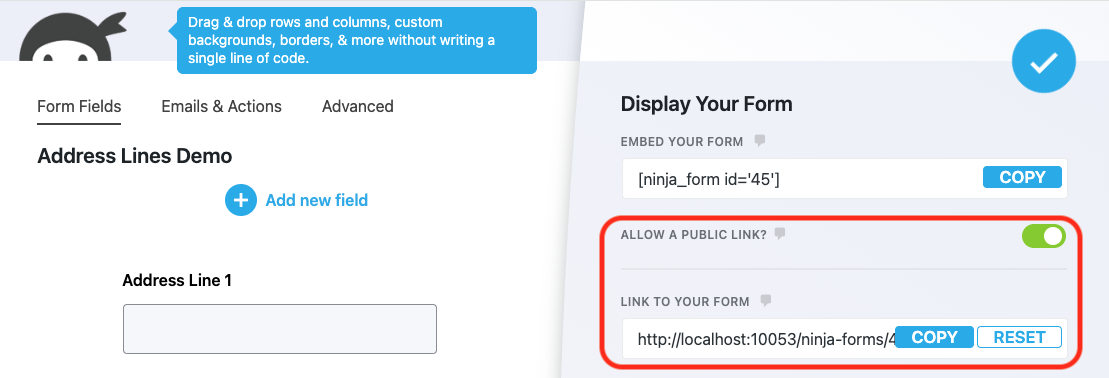
Toggle on “Allow a Public Link?” and a URL will appear. Copy it and share it wherever. Anyone with access to the link will have access to the form to fill and submit (but not edit etc).
Option 5: Place the form in a popup
You’ll need the free Popup Maker plugin for this one. They’re a partner of ours going back many many years and play nicely together. This method is similar to the shortcode method above. You’ll need to create a popup using Popup Maker, then copy and paste the shortcode of the form you want into the popup. There’s a full step by step guide if you want to go this route. It’s easy, just a few extra steps to make the popup.
Drop a form anywhere in less time than it takes to scan this article!
Your first time might take a few minutes, but once you have it down it takes literal seconds to add a WordPress form anywhere. Post, page, popup, or shareable link. Grab Ninja Forms today and get those submissions rolling in!
So the ninja_forms_display_form() function is not available anymore?!
I pitched this question directly to our development team and am pasting their response:
ninja_forms_display_form( 4 ) should still work, although the best way to do it is: Ninja_Forms()->display( 4 );
Hope that helps!
Cheers,
Quay
Can you only put the same shortcode once in a post? I’m trying to put it in twice (bottom and top of the post) and the second one isn’t rendering. :/
Kristie,
Yes unfortunately, you can only append a form to a page once. If you want the same form to appear twice, I’d recommend duplicating the form and using the shortcode from the duplicated form as your copy.
Cheers,
Quay
Does the short code work when I want to hyperlink the form to some text? For example, if someone were to click on the text Holiday Schedule 2017, I would want it to open the form I created with all of the dates. I can’t seem to figure out how to do that – when I paste the short code in as the hyperlink, it doesn’t seem to work.
Charlie,
The shortcode won’t do you any good as a part of a hyperlink, sorry. I’d recommend placing the form on its own page and linking to that page instead 🙂
Cheers,
Quay
im using ninja forms. one of the box i’m doing is for a date, which offers a calendar pop up. however, this calendar only provide option of 10 years above and below the current date. is there an option to increase that. ie, for today, nov 7, 2017, the calendar pop up only gives me option of year 2007 to 2027. if i wanted a date from 1989, i would have to enter it manually. thank you
Patrick,
Hey! In the Datepicker field, expand the Advanced options. You can set the range a user can enter there.
On the front end, a user can click the Month to open a list of months, and the year to open a list of years within the range you’ve specified.
Hope that helps!
Cheers,
Quay
I use the contact form but do not get the e-mail request sended with the form. Do I have to change the {system:admin_email}? And how?
Tina,
Hey! Check out this article series on troubleshooting email: https://1a80eb25-3346-4ab7-bfe7-c210e4f3f025.cc09.conves.io/troubleshooting-ninja-forms-email-part1/
There could be a number of reasons why your email doesn’t send, and that will walk you through many of them. You’re more than welcome to drop a ticket into our support channel as well!
Cheers,
Quay
If I did not get a paid membership, can I only use ninjaforms in one wordpress website? (i.e. the wordpress sites are linked under one account)
Edgar, the free Ninja Forms core plugin can be installed on as many sites as you like with no restrictions.
Hi. It’s possible to use something like Ninja_Forms() -> display(id) function but instead of the ID use the form key to select the form?
Miguel,
Hey! Possible, yes… but it would require custom modification to make it work. Please reach out to our customer support team for further support on this matter: https://1a80eb25-3346-4ab7-bfe7-c210e4f3f025.cc09.conves.io/contact/
Cheers,
Quay
Is there a shortcode attribute to reference a form by name rather than id? After exporting a form on dev site and importing on production, the id is not the same, so other places where the shortcode is used (eg. imported pages, widgets and popups) have to be updated with new id’s.
Jesse,
Right now no, I’m sorry. There’s no other native way outside of the form id. This is a pain point that’s on our dev team’s radar, and they do have some ideas on how to alleviate it, but it’s more than likely a ways off right now.
Regards,
Quay
is there any way to show the user the data after submission of the form?
e.g. I made a form with 2 textFields Name & mobile Number. When the user press the submit button. I want to show this info i.e His Name & mobile Number e.g. “Thank you. You have submitted Name: xyz & Mobile Number 123”.
Rayan,
Yes! You’re looking for merge tags: https://1a80eb25-3346-4ab7-bfe7-c210e4f3f025.cc09.conves.io/docs/merge-tags/
Those can be used to pull in form field data like name, number, etc to the Success Message, an email, just about wherever!
Cheers,
Quay
Is there any attribute to hide form title using shortcode?
Eddie- hey! No, but you can turn the form title off from within the form itself. Open your form, click on the Advanced tab, then Display Settings, and you’ll se a toggle for Display Form Title. Flip it so that it’s not green, and you’re set!
Cheers,
Quay
Hi!
I`m using Ninja forms for a university website, I`ve created a contact form and insert it in all the pages in need to it, but I would like to know how do I insert specific information which allows me to know from which page the form was sent.
Like when the form is opening from the (Communication Department for example ) the text area starts with the line :(Communication Department )
and when it`s opening from another page (Engineering department) the text area it starts with a placeholder (Engineering Department )
Greetings,
I’m brainstorming this and believe that you could use the Conditional Logic add-on to have it show the proper text field. You could add a Hidden field to your form and set the Default Value to “{wp:post_url}” to get the URL of the page. Over in Conditional Logic, you could have it check for certain wording within the Hidden field, show the correct Text field and hide the other ones. I hope that this helps to guide you in the right direction.
Best Regards,
Curtis
Thanks. I chose Ninja Forms and I have no regrets. Everyone will find settings for themselves. Very easy to use, well-designed UX dashboard. Currently, the best solution on the market.
Hi,
I looked into the documentation, but I couldn’t find smth about use the form with the form key. The problem is that the ID is not unique. When I import a form which had id=2, after importing it has a diferent id. So we need a name/form key (which already exists to call the shortcode by name/form key inside of PHP code. This topic is now 4 years old, what will be the solution here?
Cheers
Chris
Hello Chris,
Please reach out to our customer support team for further support on this matter: https://1a80eb25-3346-4ab7-bfe7-c210e4f3f025.cc09.conves.io/contact/
But I want to add a Ninja Form via HTML Embed – to put it in a place that WordPress doesn’t normally support. Is there a way to have an HTML embed version of the ninja form? I want to insert it from a custom script I have.
como posso ter um contato direto com o escritor deste post
?
Hi
You can reach out to us here :
https://1a80eb25-3346-4ab7-bfe7-c210e4f3f025.cc09.conves.io/contact/
Thanks
Mia