Accept Stripe Payments on any WordPress Form
Connect your Stripe account to any WordPress form and take credit cards, Apple Pay, Google Pay, ACH, and recurring payments.
Risk-Free 14 Day Guarantee
You'll love it or we'll refund you fully. No questions asked.
The Stripe payment integration for Ninja Forms connects your Stripe account to any WordPress form. Accept credit cards, Apple Pay, Google Pay, ACH bank transfers, and more through Stripe’s secure payment infrastructure. Whether you need a simple checkout form, a subscription signup, or a donation page with custom amounts, this Stripe WordPress plugin handles it from a single drag-and-drop interface.
With the Stripe add-on, you can:
Key Features
Multiple Payment Methods
Accept credit cards, Apple Pay, Google Pay, ACH, and more through Stripe.
Flexible Pricing
Fixed amounts, calculated totals, or let customers enter their own.
Recurring Billing
Set up Stripe subscriptions with optional trial periods.
Product Details
Pass product names, images, and custom metadata to Stripe.
Test Mode
Validate payments with Stripe test credentials before going live.
PCI Compliant
Card data handled securely by Stripe, not your server.
Discount Codes
Apply coupon codes to reduce payment amounts at checkout.
Payment Confirmations
Automatic receipts and payment notifications on every transaction.
Key Features of the Stripe Add-on
Accept credit cards, digital wallets, and bank transfers
The Stripe forms add-on supports every payment method available in your Stripe account:
- Credit cards
- debit cards
- Apple Pay
- Google Pay
- ACH bank transfers
- SEPA Direct Debit
- iDEAL
- Sofort
…and more are all available if enabled in your Stripe account configuration. Customers see only the payment methods you choose to enable.
Choose between card-only mode for a streamlined checkout or all-methods mode to offer every payment option your Stripe account supports. Either way, transactions process through Stripe’s secure payment gateway and appear in your Stripe Dashboard alongside all your other Stripe activity.
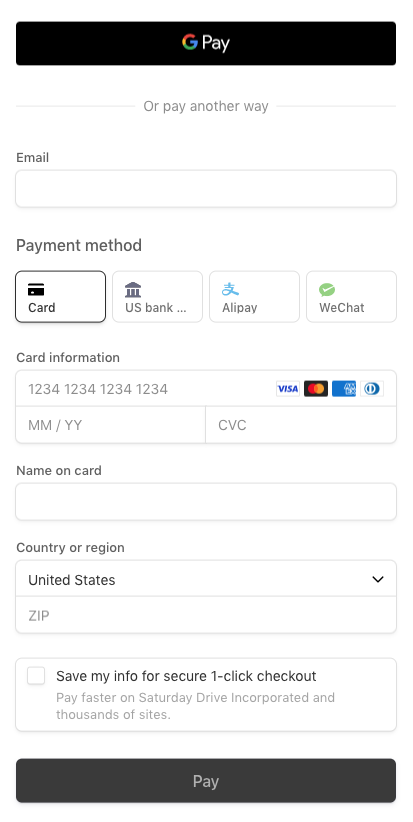
Configure flexible pricing and discount codes
Set your payment amount using four methods: a fixed price, a calculated total based on form field selections, a value pulled from a specific form field, or a recurring subscription plan. For donations, tips, or variable-price services, let customers enter their own payment amount directly on the form.
Apply discount codes to reduce payment totals at checkout. Combine flexible pricing with Ninja Forms’ calculation fields to build dynamic pricing logic that adjusts automatically based on what customers select.
One-time and recurring Stripe payments
The Stripe add-on supports both one-time charges and recurring subscriptions from the same WordPress form.
One-time payments: Set a fixed price, calculate the total from form selections, or let the customer enter a custom amount. Each transaction processes immediately through Stripe and appears in your Dashboard.
Recurring payments connect to Stripe subscription plans you configure in your Stripe Dashboard. Create a subscription plan in Stripe, then reference its Plan ID in the Stripe action. For forms that offer multiple subscription tiers, use a Select field to let customers choose their plan, with each option mapped to a different Stripe subscription.
Add optional trial periods so customers can try before they commit. Stripe manages the billing cycle automatically: after the initial form submission, renewals process in the background without requiring the customer to return to your site. View, modify, pause, or cancel subscriptions directly from your Stripe Dashboard.
Customize product details for every transaction
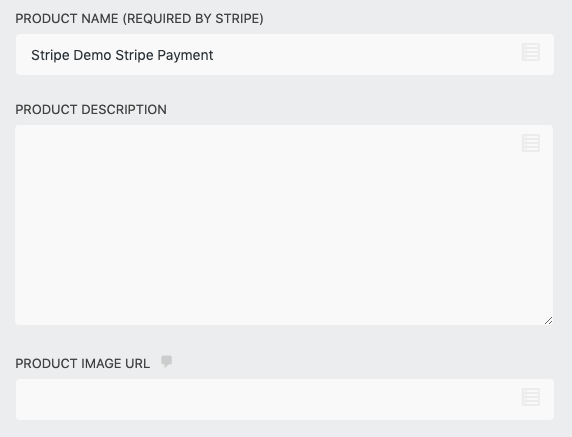
Pass product names, descriptions, images, and custom metadata to Stripe with every transaction. Your Stripe Dashboard displays the full context of each payment, not just a dollar amount. Include a product image URL, a custom description, and key-value metadata pairs that map to your own tracking needs.
Stripe merge tags like {stripe:chargeID} and {stripe:customerID} let you reference transaction details in email notifications and success messages. This makes it easy to include specific payment information in every customer communication.
Send payment confirmation emails automatically
Trigger confirmation emails to customers and notification emails to your team when a payment succeeds. Combine Ninja Forms’ email notification actions with Stripe merge tags to build custom receipts that include the charge ID, last four card digits, card type, and customer ID alongside your form’s submission data.
Provide a customer email address to Stripe so customers also receive Stripe’s built-in payment receipts. Between Ninja Forms email actions and Stripe’s own receipt system, every successful transaction can generate confirmations for both sides of the payment.
Test payments with Stripe test mode
Validate your payment forms using Stripe’s test mode before accepting real transactions. Enter your Stripe test API keys in the Ninja Forms settings, process test transactions with Stripe’s test card numbers, and confirm that your form logic, pricing calculations, and confirmation emails work correctly.
When everything checks out, switch to your live API keys and start processing real payments. Test mode lets you build and verify your entire payment workflow without risking real charges or exposing customers to an unfinished form.
Your Forms, Now Payment-Ready
Take payments on your own site, on your terms, with no third-party page between your form and the sale. Add it to your cart and start collecting payments inside your forms.
Backed by priority email support and a 14-day money-back guarantee.
Build Stripe Forms Without Code
Every Stripe payment starts with a form. Add a Stripe action to any WordPress form, configure your pricing, and publish. No custom development, no shortcode configuration, no separate checkout page required.
Collect billing information alongside any other data your form needs: contact details, shipping addresses, product preferences, or custom questions. Every field you add works seamlessly with the Stripe payment action.
Your Stripe payment form integrates with every Ninja Forms feature. Add email notifications, success messages, or redirect actions that fire after a successful payment. Map form fields to Stripe metadata so every transaction in your Stripe Dashboard carries the full context of what was purchased and who purchased it.
PCI Compliant Payment Processing
Accepting credit cards online means handling sensitive card data responsibly. The Stripe add-on routes payment processing through Stripe’s PCI-certified infrastructure, so card numbers, expiration dates, and security codes never touch your WordPress server.
Stripe handles encryption, tokenization, and compliance on their end. Your site needs an SSL certificate and TLS 1.2 for live payment processing, which most modern WordPress hosts include by default. To your visitors, the payment experience feels seamless. Behind the scenes, Stripe manages the security so you do not need to obtain your own PCI certification.
The add-on also supports Strong Customer Authentication (SCA) and 3D Secure card payments, meeting EU payment regulations for additional transaction verification. If a payment fails due to an expired card, insufficient funds, or a declined transaction, the form displays a clear error message and lets the customer try again without losing the rest of their form data.
Common Use Cases
- Sell products and services without a full ecommerce setup: Collect payment for individual products, consulting packages, or one-time services directly through a form. No shopping cart or ecommerce plugin required.
- Collect donations and fundraise online: Let supporters choose a preset amount or enter their own. Offer multiple payment methods through Stripe to remove friction from giving.
- Bill clients on a recurring schedule: Set up Stripe subscriptions for membership dues, monthly retainers, or SaaS billing. Stripe handles renewals automatically after the initial form submission.
- Register and charge attendees for events: Collect attendee details and process registration fees in one form. Pair fixed pricing with discount codes for early-bird or group rates.
- Accept payments alongside complex form data: Combine payment collection with additional form fields, conditional visibility rules, or multi-step workflows. The Stripe add-on works with other Ninja Forms add-ons to handle payment as part of a larger data collection process.
Donations, Recurring Gifts, and Event Tickets in One Form
Run your year-end appeal, monthly giving, and event ticket sales from the same form your supporters already trust, with no separate donation platform to maintain. Add it to your cart and take your next campaign live.
Priority email support and a 14-day money-back guarantee included.
Frequently Asked Questions
-
Install the Stripe add-on for Ninja Forms and enter your Stripe API keys in the Ninja Forms settings. Then open any form in the builder, add the Collect Payment action, and configure your pricing. You can test transactions using Stripe's test mode before accepting real payments. The entire setup takes just a few minutes with no coding required.
-
The Stripe add-on supports every payment method available in your Stripe account, including credit cards, debit cards, Apple Pay, Google Pay, ACH bank transfers, SEPA Direct Debit, iDEAL, and Sofort. Choose between card-only mode or all-methods mode. You control which methods are active, and customers see only the options you enable.
-
Yes. The Stripe add-on connects to subscription plans you create in your Stripe Dashboard. Reference a Plan ID in the Collect Payment action to set up recurring billing. You can add optional trial periods, and Stripe handles renewals automatically after the initial form submission.
-
Yes. The Stripe add-on routes payment processing through Stripe's PCI-certified infrastructure. Credit card numbers, expiration dates, and security codes are handled entirely by Stripe and never stored on or passed through your WordPress server. Your site needs an SSL certificate for live payments, which most WordPress hosts include.
-
Yes. Enter your Stripe test API keys to process test transactions. You can verify form behavior, payment logic, and confirmation emails using Stripe's test card numbers without processing real charges. Switch to your live API keys when you are ready to accept real payments.
-
Yes. You can apply discount codes to reduce payment totals at checkout. For donations, tips, or variable pricing, let customers enter their own payment amount directly on the form. You can also set calculated totals based on form field selections, or fixed amounts for specific products and services.