Turn Long Forms Into Easy Steps
Guide users through long forms one step at a time, with progress bars and breadcrumb navigation that show them how far they've come.
Risk-Free 14 Day Guarantee
You'll love it or we'll refund you fully. No questions asked.
Long forms kill completion rates. The Multi Step Forms add-on turns any Ninja Forms form into a guided, step-by-step experience that keeps users moving forward. Break lengthy forms into multiple steps, add a progress bar so visitors can see how far along they are, and use breadcrumb navigation to let them jump between steps freely.
Whether you call it a multistep form, a multipart form, a form stepper, a form wizard, or a multi-page form, this WordPress plugin lets you build it from a single drag-and-drop interface. Multi Step Forms works seamlessly on desktop and mobile, so your step forms look and function correctly on every device.
With Multi Step Forms, you can:
Key Features
Drag & Drop Steps
Break long forms into multiple steps and drag fields between pages.
Progress Bar
Visual progress indicator showing users how far along they are.
Breadcrumbs
Clickable breadcrumb navigation for jumping between completed steps.
Named & Numbered Steps
Give each step a clear name and number that shows in the progress bar and breadcrumbs.
Per-Step Validation
Catch missing fields step by step, so users fix errors as they go, not all at once at the end.
Mobile Responsive
Multistep forms that work seamlessly on every screen size.
Key Features of Multi Step Forms
Break long forms into steps with drag-and-drop
Converting a single-page form into a multi step form takes seconds, right inside the Ninja Forms builder you already use:
- Open any form and click the plus icon to add a step.
- Drag fields between steps, and drag the step tabs to reorder them.
- Give each step a clear name, like “Your Details,” then “Review.”
- Turn on the progress bar and breadcrumbs in the form’s Advanced settings.
There is no limit to the number of steps, so whether your form needs 3 or 15, the builder handles it the same way.
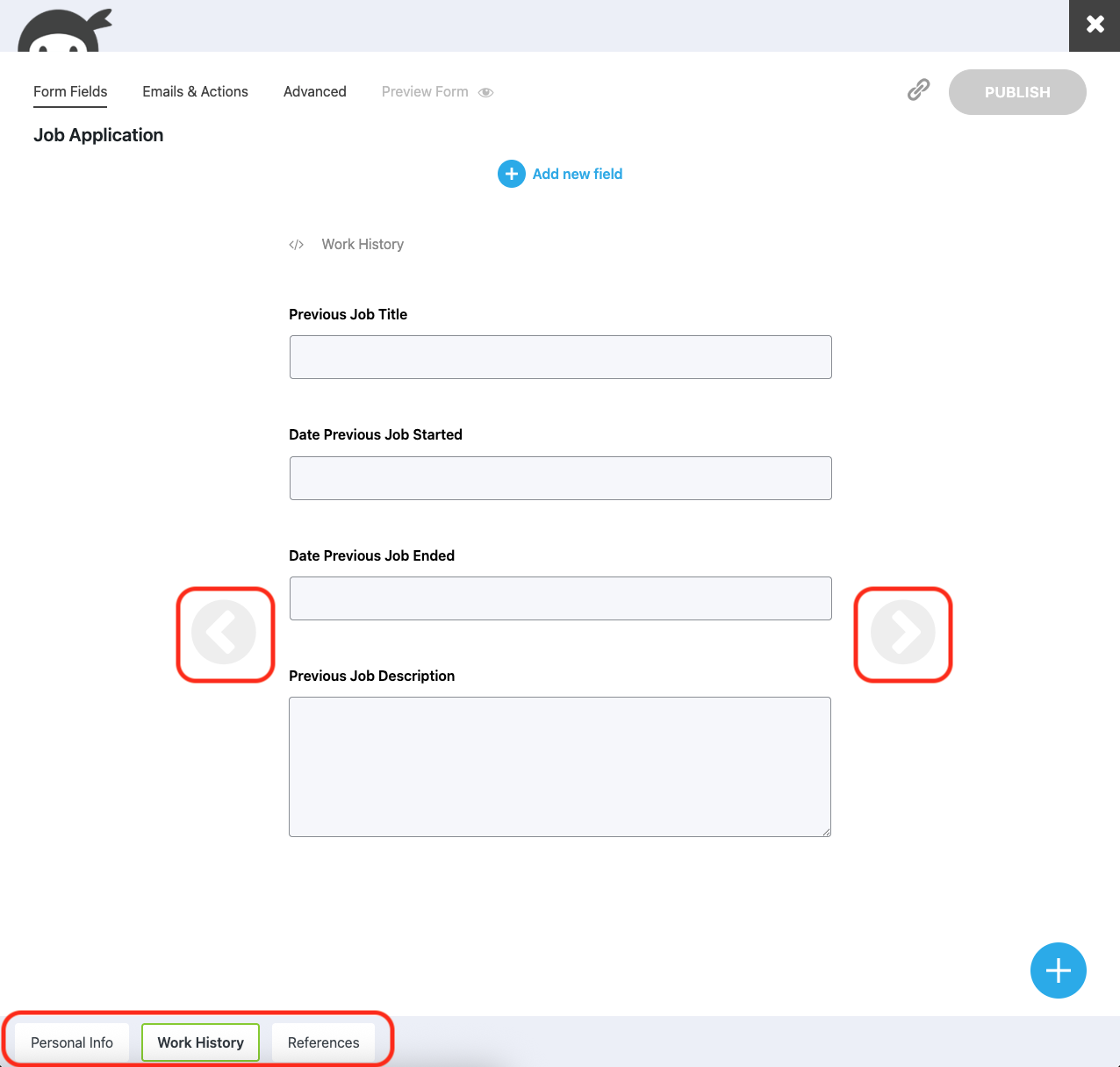
Add a progress bar and breadcrumb navigation
Multi Step Forms includes two navigation styles that work independently or together. A progress bar fills as users complete each step, setting clear expectations for how much of the form remains. Breadcrumb navigation adds clickable step labels at the top of the form, letting users jump to any completed step to review or edit earlier answers. Enable one, both, or neither in the form’s Advanced settings.
Both the progress bar and breadcrumbs display the custom step titles you configure in the builder. Form pagination across multiple steps keeps the layout clean on mobile devices, and the navigation scales so users can track their progress on any screen size.
Per-step validation ensures users complete all required fields before moving forward. Errors are flagged within the current step rather than at the end, so visitors correct mistakes as they go instead of facing a wall of error messages on submission.
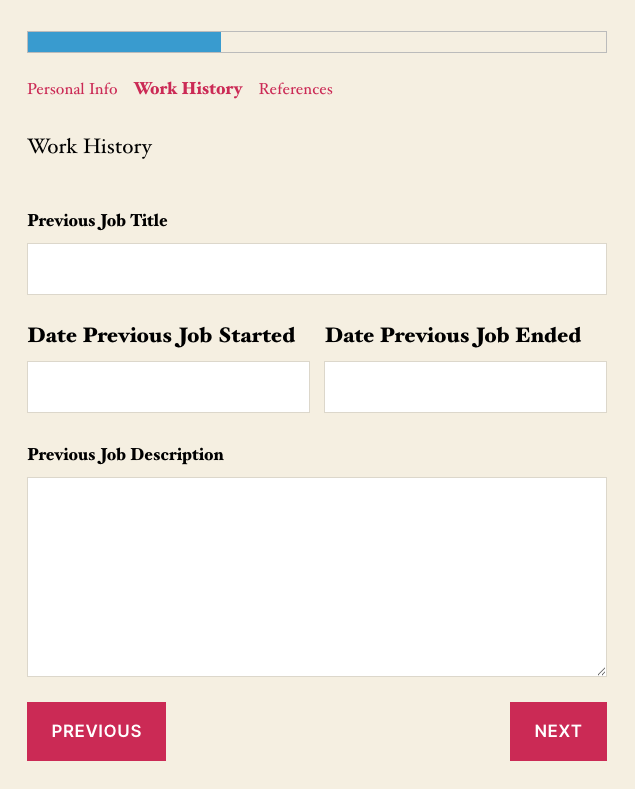
Customize step names and numbering
Give every step a clear name instead of a generic number. Labels like “Personal Details,” “Preferences,” and “Review” tell visitors where they are and what comes next.
- Rename a step in one click: open its part settings and type the title.
- The name updates everywhere at once: builder tabs, progress bar, and breadcrumbs.
- Combine names with numbers for full control over how each section reads.
Show or hide steps with conditional logic
Not every user needs to see every step. When paired with the Conditional Logic add-on, Multi Step Forms can show or hide entire form steps based on user input. A job application form might display a portfolio step only for design roles. A survey might skip follow-up questions when a respondent selects “Not applicable.” Conditional step logic keeps forms relevant and concise.
Users see only the steps that apply to them, which means shorter paths to completion and less frustration. The logic is configured in the same Conditional Logic panel you already use for showing and hiding individual fields.
Save progress and return later
Long forms sometimes require information that users do not have on hand. When paired with the Save Progress add-on, Multi Step Forms lets users save their place and return later to pick up where they left off. This is especially useful for detailed applications, enrollment forms, and multi step surveys where visitors may not finish in one session. Saved progress preserves all entered data across steps. When users return, they resume at the exact step they left, with all previous answers intact.
Long Forms That People Actually Finish
Add Multi Step Forms to your cart for $29 and turn any lengthy form into guided steps with a progress bar, so fewer visitors stall and more reach submit.
Backed by priority email support and a 14-day money-back guarantee.
Build a Form Wizard in WordPress
A form wizard guides users through a structured sequence of questions, collecting information one section at a time. Multi Step Forms turns your WordPress forms into wizard forms with step-by-step navigation, visual progress indicators, and the option to conditionally route users through different paths.
Form wizards are the right fit for onboarding flows, diagnostic tools, recommendation engines, and any scenario where the next question depends on the previous answer. Pair with the Conditional Logic add-on to build dynamic wizard forms that skip irrelevant steps entirely, adapting to each visitor’s input as they move through the form. Wizard-style forms reduce cognitive load by showing only one section at a time. Visitors focus on the current step instead of scrolling through a page full of fields. The result: higher completion rates and better data quality from every submission.
Create Conversational Forms in WordPress
Conversational forms present questions one at a time, creating an interactive, chat-like experience. Multi Step Forms enables this pattern by breaking your form into individual steps, each containing just one or two fields. Combined with a progress bar and smooth step transitions, your forms feel less like paperwork and more like a guided conversation. This approach works well for lead generation, surveys, and feedback forms where engagement matters more than speed. Users stay focused on each question, provide more thoughtful answers, and are more likely to complete the form.
By converting a single-page form into a conversational flow, you reduce visual overwhelm and keep visitors moving through each step. There is no separate conversational form add-on needed. Multi Step Forms handles it by letting you control how many fields appear on each page.
Common Use Cases
- Split contact forms into guided steps: Organize a multi step contact form into sections for personal details, company information, and message. Visitors provide context in clear steps rather than one cluttered page, which reduces abandonment on longer inquiry forms.
- Collect job applications and intake information: Gather resume details, work history, and references across separate steps. Use conditional step logic to tailor the form based on the role being applied for, so each applicant sees only the questions relevant to their position.
- Run surveys and collect feedback: Present one question group at a time to reduce survey fatigue. A progress bar shows respondents how close they are to finishing, and save-and-continue lets them pause and return if the survey is long.
- Register attendees for events: Collect attendee information, session preferences, and payment details in clear stages. Pair with a payment add-on to process registration fees at the final step.
- Qualify leads with step-by-step questions: Ask qualifying questions one step at a time, using conditional logic to route prospects through different paths based on their answers. Shorter visible forms encourage more visitors to start, and each step narrows the lead toward qualification.
Built for Your Longest Forms
Applications, enrollment, event registration, surveys: the forms that ask the most are the ones visitors abandon first. Multi Step Forms breaks them into guided steps so applicants and registrants finish. Add it to your cart for $29.
Every purchase backed by priority email support and a 14-day money-back guarantee.
Frequently Asked Questions
-
A multi-step form (also called a multistep form, multi-page form, form wizard, or step form) breaks a long form into multiple pages or steps. Users complete one section at a time and navigate forward using buttons, breadcrumbs, or a progress bar. Multi step forms improve completion rates by reducing the visual complexity of lengthy forms.
-
Ninja Forms Multi Step Forms is a dedicated multi step form plugin for WordPress. It includes drag-and-drop step creation, progress bars, breadcrumb navigation, conditional step logic, and mobile-responsive design. The add-on is available as a standalone purchase starting at $29/year, or included with any Ninja Forms membership.
-
Install the Multi Step Forms add-on and open your form in the Ninja Forms builder. Create at least two steps, then enable the progress bar option in the form's Advanced settings. The progress bar appears at the top of your form and updates as users complete each step. You can use it alongside breadcrumb navigation or on its own.
-
A form wizard is a guided, step-by-step form that collects information in a structured sequence. Each step focuses on one topic, and users navigate forward with a "Next" button. Form wizards are used for onboarding flows, applications, and diagnostic tools. Multi Step Forms lets you build wizard forms in WordPress without writing code.
-
Yes. When paired with the Save Progress add-on, users can save their place in a multi step form and return later to complete it. This is useful for lengthy applications, enrollment forms, and surveys where visitors may not finish in one sitting.
-
Yes. Pair Multi Step Forms with the Conditional Logic add-on to create forms that show or hide entire steps based on user selections. For example, you can display a "Company Details" step only when a user selects "Business" as their account type. The logic is configured in the Conditional Logic panel.
-
Yes. Multi step forms built with this add-on are fully responsive and work on phones, tablets, and desktops. The progress bar, breadcrumbs, and step navigation scale to fit any screen size, so users have a consistent experience regardless of their device.