Growth Through Relationships
Your customer's journey begins with your forms. Send contacts, leads, opportunities, custom fields and more. Connect seamlessly from WordPress to Insightly.
Risk-Free 14 Day Guarantee
You'll love it or we'll refund you fully. No questions asked.
Building deeper customer relationships means your business grows faster. That kind of relationship-driven growth has long been the strength and specialty of Insightly CRM. As both a WordPress and Insightly user, there’s only one real obstacle to tap into the full potential of their service:
A fully featured integration between WordPress and Insightly can be hard to find.
- Searched the WordPress.org repository for a plugin that links your WordPress website to Insightly?
- Maintaining an expensive custom solution between WordPress and Insightly?
- Still manually transferring customer data?
Stop now. There’s a far better solution that frees up your resources to be better spent elsewhere. Connect your WordPress website directly to Insightly CRM via your WordPress forms/
Effortlessly connect WordPress with Insightly CRM through your WordPress forms
The Insightly CRM extension for Ninja Forms enables you to send customer submitted data from your WordPress forms directly into your CRM account. Easily create:
- Contacts
- Leads
- Organizations
- Opportunities
- Projects
- Notes
- Tasks
Establishing a connection is incredibly simple. All you have to do is copy the Insightly API key from your account and paste it into the Insightly Settings of Ninja Forms. Test to validate the connection, add an Insightly CRM action to any form, and then map form fields to CRM fields.
Full support for Optional Modules
In addition to creating your Lead or Contact in Insightly, you have the ability to attach various other modules to your newly created person. Opportunities, Projects, and Tasks are all available, and each have a number of fields available to more fully develop your new lead or contact. See our documentation for full details.
Easily map any WordPress forms field to any Insightly CRM field
Selecting how data is transmitted to Insightly is a breeze. With your connection established, you have ful access to every field in your Insightly account.
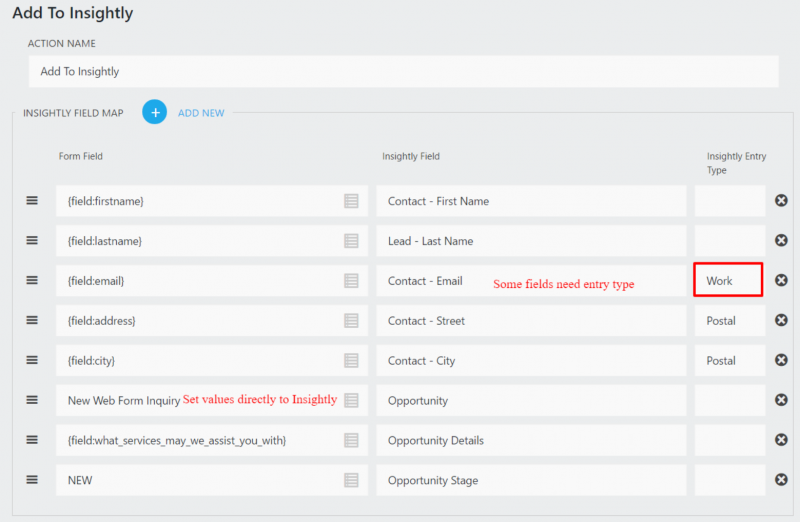
Simply select the form field (left), pair it with the Insightly account field (right), mark it with an Entry Type if desired, save, and go. That’s quite literally all there is to it!
What are you waiting on? Link your WordPress website to Insightly CRM easily and completely today.
Frequently Asked Questions
-
We have a dedicated support team standing by to help with anything you may need. We’re available 9am-4pm EST, Mon-Fri, and strive to answer all customer requests within 24 hours.
-
Licenses are subscription based and will auto-renew each year unless cancelled. If cancelled, you may still use your extensions but will no longer receive important updates or support once the license expires.
-
We don't have a demo or trial version of our add-ons, but we do offer a 14-day full refund policy for any reason whatsoever.