On-Brand, Every Time
Connect your WordPress forms to Emma and automatically add subscribers to the right Emma group on every submission.
Risk-Free 14 Day Guarantee
You'll love it or we'll refund you fully. No questions asked.
Emma (myemma.com) is an email marketing platform built for agencies, nonprofits, and growing businesses that need audience segmentation and list management without the complexity of enterprise tools. The Emma add-on for Ninja Forms connects your WordPress forms directly to your Emma account so every form submission automatically adds that contact to the right group.
No manual exports. No copy-paste between platforms. Just a clean, direct connection between your form and your Emma audience.
With the Emma add-on, you can:
Key Features
Auto-Subscribe on Submit
Every form submission adds the contact to your Emma group automatically.
Group & Subaccount Selection
Choose which Emma group receives subscribers, with full support for multi-subaccount setups.
Field Mapping via Merge Tags
Map form fields to your Emma list fields using the merge tag picker for accurate data transfer.
Dynamic Field Population
Emma field names load automatically from your account, so your mapping is always current.
Opt-In Checkbox Field
Require explicit consent before enrolling subscribers, supporting GDPR and PECR compliance flows.
Simple API Setup
Connect with your Account ID, Public API Key, and Private API Key in one-time global settings.
Key Features of the Emma Add-On
Automatic subscriber enrollment on form submission
When someone submits your form, the Emma add-on fires automatically and adds them to your specified Emma group. There is no export file to download, no import step in Emma, and no manual followup required. The connection runs in the background every time a form is submitted.
Emma group selection with subaccount support
Choose which Emma group receives new subscribers directly from the form action settings. If your Emma account includes subaccounts, each subaccount has its own Account ID. Enter the correct Account ID for the subaccount you want to use, and that subaccount’s groups will be available in the dropdown selector. This makes the add-on a workable fit for agencies managing multiple client Emma accounts from one WordPress install.
Field mapping via merge tags
Once you select an Emma group, the fields from that group populate automatically below the dropdown. Map each Emma field (name, email address, and any custom fields you have set up in Emma) to the corresponding Ninja Forms field using the merge tag picker. This keeps your Emma audience data structured and consistent with your existing list setup.
Dynamic field name population
Your Emma field names are pulled directly from your connected account each time you open the action settings. You do not maintain a manual list of field names in Ninja Forms. When you add or rename fields in Emma, those changes reflect automatically the next time you configure the action. This was introduced as a quality-of-life enhancement in version 3.0.5.
Opt-in checkbox field
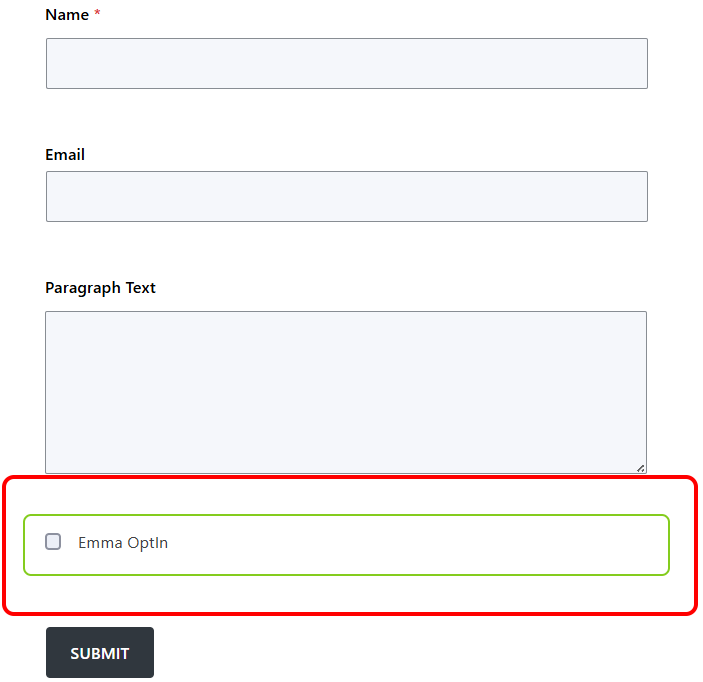
Add an Emma Opt-in field to your form to require explicit subscriber consent before enrolling anyone in your list. When a visitor submits the form without checking the opt-in box, the Emma action is skipped entirely and no contact is added. This gives you a straightforward mechanism for building consent into your signup flow, which is useful for organizations working within GDPR or PECR requirements.
Simple API connection
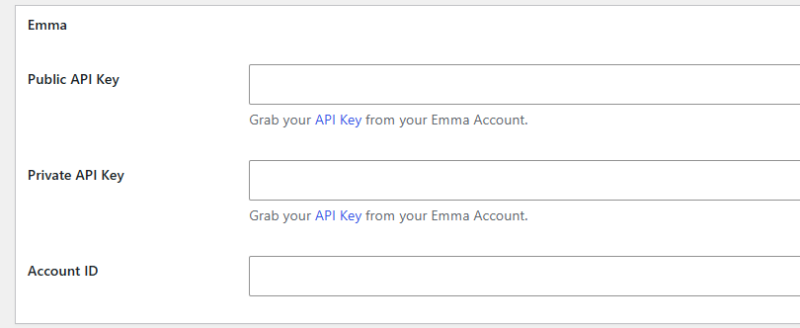
Connecting your Emma account takes three values from your Emma dashboard: your Account ID, your Public API Key, and your Private API Key. Paste them into the Emma section under Ninja Forms global settings. That one-time setup is all that is required before the add-on is ready to use on any form on your site.
Start Growing Your Emma List From Every Form
The Emma add-on is included with any Ninja Forms membership, or available as a standalone purchase. Pick your plan above and connect your WordPress forms to Emma today.
Priority email support and 14-day money-back guarantee included.
How the Emma WordPress Integration Works
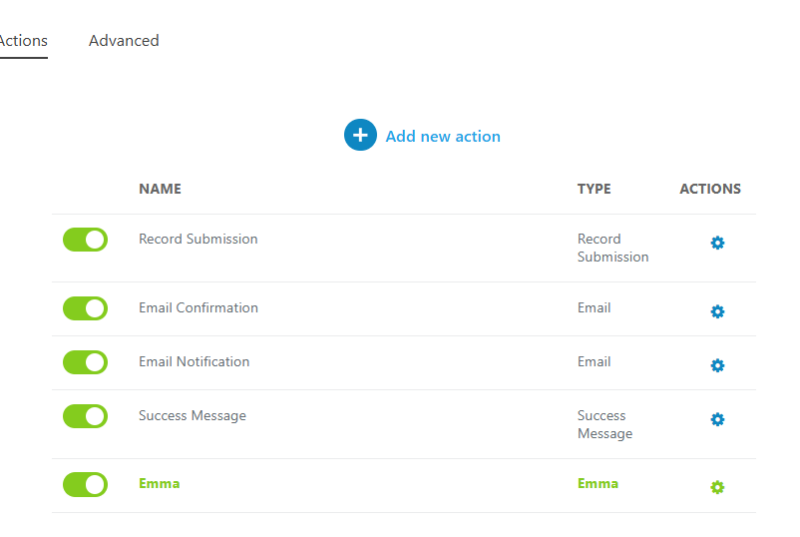
The add-on fits into the standard Ninja Forms action framework. After installing and activating the add-on, you connect your Emma account in global settings once. From there, any form on your site can have an Emma action added to it from the Emails & Actions tab. Each form can target a different Emma group, making it practical to run multiple list-building forms from one site without conflicts.
Field mapping is handled inside the action itself. You select the Emma group, the fields from that group load automatically, and you assign each field a form field value using merge tags. When a visitor submits the form, Ninja Forms passes the mapped values to Emma’s API and the contact lands in the correct group.
The opt-in checkbox works as a gate at the action level. If the visitor does not check the box, the Emma action does not fire. Every other form action (confirmation emails, notifications, redirects) continues to run as configured. Only the Emma enrollment is held.
Common Use Cases
- Grow your email list from a contact or inquiry form: Add an Emma action to any existing contact form and capture subscribers without building a separate signup form.
- Run consent-gated signups: Pair the opt-in checkbox with your lead capture forms to collect explicit email consent alongside the contact’s other information.
- Manage multiple client lists as an agency: Use subaccount support to route subscribers from different client sites to the correct Emma subaccount group without separate installs.
- Segment subscribers by form entry point: Direct visitors from different landing pages or campaigns to different Emma groups by configuring a separate Emma action on each form.
- Support nonprofit donor and volunteer outreach: Build signup forms for newsletter subscribers, volunteer interest lists, and event notifications, each routed to its own Emma audience group.
- Collect custom field data for Emma segmentation: Map form fields beyond name and email to your Emma custom fields, so subscribers arrive in your list with the segmentation data already populated.
Connect Your WordPress Forms to Emma
The Emma add-on is included with any Ninja Forms membership, or available as a standalone purchase. Pick your plan above and start sending form submissions straight to your Emma audience.
Priority email support and 14-day money-back guarantee included.
Frequently Asked Questions
-
Install and activate the Emma add-on, then go to Ninja Forms > Settings and enter your Emma Account ID, Public API Key, and Private API Key. Once connected, open any form, go to the Emails & Actions tab, and add a new Emma action. Select your Emma group, map your form fields, and save.
-
Yes. The Emma add-on integrates Ninja Forms directly with your Emma account. When someone submits a form, they are automatically added to the Emma group you specify. No manual export or import is needed.
-
Yes. Each form action lets you choose which Emma group receives new subscribers. You can run multiple forms on one site, each targeting a different group, so subscribers are segmented from the moment they sign up.
-
Yes. Each Emma subaccount has its own Account ID. Enter the Account ID for the subaccount you want to use in the Ninja Forms settings, and that subaccount's groups will be available for selection in the action configuration.
-
The Emma Opt-In field adds an explicit consent checkbox to your form. If a visitor submits without checking it, the Emma action is skipped and no contact is added to your list. Use it when you need a documented opt-in record, such as for GDPR or PECR compliance.
-
No. The add-on pulls your Emma field names directly from your connected account each time you open the action settings. If you add or rename fields in Emma, those changes are reflected automatically without any manual updates on the Ninja Forms side.
-
Licenses are subscription based and will auto-renew each year unless cancelled. If cancelled, you may still use your extensions but will no longer receive important updates or support once the license expires.