


Not every form can be a handful of fields, but you don’t want to slam your users with a mass of form fields all at one time, either. That’s where Multi Step Forms comes in. That’s the context most users think of this Ninja Forms extension in, but it can do so much more than just break your form into pages! Follow along with us this week and we’ll explore some of the features of Multi Step Forms that you won’t be able to build without, and give you even more reason to love the ones you know!
Bitesize is Better!
Ya, this is the low-hanging fruit here. Breaking a form into multiple pages makes your form less intimidating and more likely to be filled out. But did you know how much of an impact it can have? How about this: conversion rates of multi-step forms are 300% greater than single-page forms. Forms conversion plummets after adding a 5th field on a single page. We’ve talked extensively about form conversion elsewhere on the blog if you’d like to hear more. Even if your form is relatively short as it is, making it more bite-size will often be to your advantage.
Musical Fields
You’ll have to upload a music file if you actually want music, but if you’ve ever played a certain children’s game, you’ll appreciate the mobility of fields and pages in Multi-Step Forms. Easily move fields from page to page via drag and drop; just drag a field over the icon of the page you want to move it to, and voilá, it’s there. Want to reorganize pages? Drag the page into the position you want, drop it. That simple.
 Guide Your Users
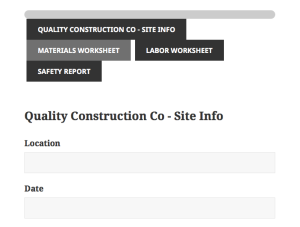
Sometimes you just have to use a long form, and when you do organization is really helpful. Multi-Step Forms offers pagination, page titles, a progress bar, and breadcrumb navigation for that purpose. Never have a user get lost in a form again!
Show Them the Finish Line
One huge drawback to a multipage form is the risk of losing your user partway through. Minimize that chance by showing them exactly where in the form they are and how much farther they have to go! Multi-Step Forms features a progress bar that fills as the user progresses. When they know the finish line is right around the corner, they’re much less likely to quit.
Check Your Work
I never had a math teacher that didn’t berate me for not checking my answers, and the adult in me is glad I did. It prevents a lot of dumb errors and saves time, too. If you’re running a company where having workers report in via form is an important part of your work cycle, it saves time and money. Not a hard decision here. Multi-Step Forms gives you the power to add a review page with a custom message on the end of your form where information can be double checked before submission, weeding out the typos that cost you money when they slip through.
Bonus Feature!
This is an integration with our Conditional Logic extension, and it’s a powerful way to streamline data collection and keep your records organized. Patient intake forms are one example of a popular use case for Ninja Forms. Most of us have filled out a medical form, or many other form for that matter, where much of the form itself simply doesn’t apply to us. For those field groups that just don’t apply to most people, using Multi-Step Forms + Conditional Logic, you can place those fields on a page of their own and have them appear only if the user provides data in prior fields that indicate that they are relevant! Never have an employee or guest flip through unnecessary form pages again!
 Guided progress and subtle encouragement to convert for your users, easy building for you, and a time and money saver for everyone. There’s so much more to Multi-Step Forms than simple page divisions, and once you make it a part of your form-building experience, you’ll wonder how or why you ever managed without it! Give it a spin and start enjoying the benefits for yourself today!
